Watermark-free download
Save clean video files when the platform provides no-watermark sources.
Paste a video link, a playlist, or multiple links. Choose your format and save.
If you did not choose a folder, check the browser downloads list or your device Downloads folder.
Still having trouble? Report the problem in our Discord channel. You may need to sign in and join the server.
Get help on DiscordFound a video or image on a site like Taobao? Use the extension to detect and download it in one click.
For Chrome on desktop
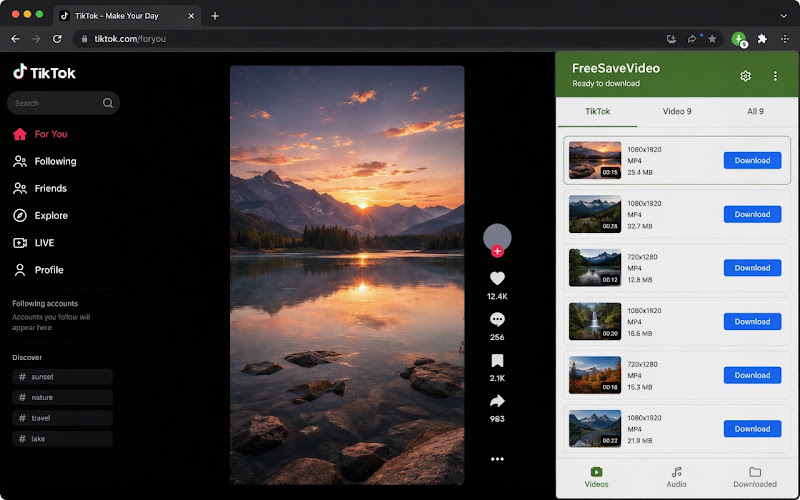
Need more than downloading? These tools stay one tap away without taking over the homepage.
Supports publicly accessible content from the platforms shown in the supported services list, including YouTube, TikTok, Bilibili, Sohu Video, NicoNico, Kuaishou, Weibo, Amazon Live, NAVER, Xiaohongshu, Instagram, Threads, X (Twitter), and Facebook. Save available formats on mobile or desktop; quality depends on the source and parsing result.
Supports domestic and international versions of TikTok/Douyin. One-click watermark removal, keeping HD audio and video.
Supports anime, uploader submissions, and course videos. Preserves clarity and subtitles.
Download public, free iQIYI videos as playable MP4 files while excluding separate player ad clips.
Copy Kuaishou links to analyze. Batch downloading is more efficient.
Paste a Haokan/Baidu video link to save available MP4 quality variants, including HD options when provided by the source.
Paste a public Toutiao video link to save available MP4 quality variants, including HD options when the source provides them.
Download public Sohu Video pages as MP4, with audio-only and mute modes available.
Copy the Weibo video address or t.cn short link to extract available MP4 quality options.
Save public Amazon Live replay videos from amazon.com/live/video or amazon.com/vdp links with available HLS quality options.
Save public NAVER videos from naver.me and m.naver.com/shorts links.
Save public NicoNico watch and shorts videos with available HLS quality options.
Removes in-app watermarks, keeping cover images and original HD sound.
Supports Reels, posts, and story videos. Save directly to your local device.
Paste a public Threads post link to save available videos or photos directly.
Save public images and available video previews from Magnific pages explicitly marked free. Premium assets, private creations, and credit-based exports are excluded.
Direct YouTube video and audio downloads are now supported. Paste a link and download instantly. Supports Shorts and multiple quality options.
Parses public Facebook videos and Reels and shows the resolutions available from the source. Private or login-required content is not supported.
Copy tweet links to extract original videos while maintaining clarity.
FreeSaveVideo lets you download online videos without installing software. Paste a supported platform link, including NAVER / Korean Naver links, and save available HD video when possible.
You can process single links, batch downloads, collection and playlist pages, then switch to audio-only or mute mode before saving.
Save clean video files when the platform provides no-watermark sources.
Auto-detect collection, season, and playlist links and queue the full set when supported. Example links: Bilibili multi-part or collection pages, TikTok playlist links, and YouTube playlist links such as https://www.youtube.com/playlist?list=PLsyeobzWxl7poL9JTVyndKe62ieoN-MZ3
Paste multiple links separated by spaces or line breaks and process them together.
Switch between auto, audio-only, and mute mode before downloading.
Copy the public video URL, paste it into the box, use Auto mode and choose a detected result.
Batch mode supports multiple links and compatible playlists. Choose Auto, audio-only or mute before starting and follow the queue.
It works in mobile and desktop browsers. HD or watermark-free options appear only when the source provides them.
Earn points by chatting with us, inviting friends, or introducing FreeSaveVideo to others.
Some website features use credits or require membership. Check prices and renewal terms before purchasing.
View detailsStill having trouble? Report the problem in our Discord channel. You may need to sign in and join the server.
contact us